
Which Healthcare Workflows Should You Automate First? Count the Decisions
Healthcare AI tends to start where it is most visible and stall there. The better first move is in the back office, and you can find it by counting the decisions.

Ask a healthcare leadership team where AI should go first, and the answers usually point at the most visible work: an ambient scribe in the exam room, a voice agent on the phones, a chatbot on the patient portal. Those are real opportunities. They are also some of the hardest places to start, because they sit closest to physicians and patients, where accuracy, preference, and trust all matter at once.
One practical place to start is less glamorous: the back office, where routine workflows can be measured, standardized, and improved before automation reaches patients or physicians.
Key Takeaways
- Visible AI use cases (scribes, voice agents) are often harder first projects than back-office workflows like claims and prior authorizations.
- Ben Seals, CEO of Thomas Eye Group, started with billing workflows and scaled from supporting 7 providers to more than 30, processing nearly 3,500 claims a day with automation handling roughly 80 to 85% of the work.
- A practical screening heuristic: start with routine processes that have a small number of predictable decision points (Ben puts it at roughly 3 to 7), and route judgment calls to people. What the decisions require matters as much as how many there are.
- Transcription is not documentation, and a working voice agent is not the same as patient trust. Both need more than a model.
- AI cannot fix a broken process. Map and fix the workflow first, then automate it, then measure it.
Why the most visible AI project isn't always the best first project
On a recent episode of Engineering Choices You Have to Defend, Ben Seals walked through the AI and automation projects his organization has run across billing, clinical documentation, patient communication, and staff training. Some delivered large improvements. Others did not meet expectations. The difference between the two groups had less to do with the technology than with where each project started.
The pattern is common across healthcare organizations. The projects that get attention are the ones a patient or physician will see, so they get the budget first. But visibility and readiness are different things. A clinical note has to match how a specific physician documents. A phone call has to work for a patient who may simply prefer a person. Those constraints do not show up in a demo, and they are where many first projects stall.
What Ben automated first, and what it did
Ben's organization started with back-office billing, on clearly defined workflows such as prior authorizations and claims processing. By his account, that work let the same operation grow from supporting 7 providers to more than 30. The team now processes nearly 3,500 claims a day, with automation handling approximately 80 to 85% of the work. (That is Ben's share of the work, not necessarily claims processed with no human touch.)
Two things about that result are worth noticing.
First, the win was capacity. The back office absorbed more than four times as many providers, an outcome a CFO can verify in throughput and provider count rather than in a survey of how people feel about the tool.
Second, the remaining 15 to 20% should not automatically be treated as a failure. In a well-designed automation system, exceptions can be intentional: cases involving ambiguity, missing information, or judgment are routed to people rather than forced through an automated decision. The goal is not necessarily 100% automation. It is reliable throughput with appropriate human oversight.
Prior authorization in particular is under pressure regardless of AI. The CMS Interoperability and Prior Authorization Final Rule requires impacted payers to send prior authorization decisions within 72 hours for expedited requests and seven calendar days for standard ones, with operational provisions generally starting in 2026 and API requirements generally starting in 2027. On the provider side, the AMA's physician surveys report that prior authorization continues to interfere with patient care. The rule increases the operational pressure to improve prior authorization workflows. It does not make every authorization decision suitable for automation, and its requirements apply to specified impacted payers rather than every healthcare organization. The parts that follow explicit rules are still good candidates to automate.
Count the decisions
The most useful idea in the conversation is also the simplest. Ben describes the best starting point for AI as a routine process with a limited number of decision points, roughly 3 to 7, while more complex situations stay under human review.
The number is a screening heuristic, not an automation threshold. Seven predictable, low-risk decisions may be straightforward to automate. Three decisions involving clinical judgment, incomplete data, or significant consequences may require human oversight. What matters is not just how many decisions a workflow contains, but what those decisions require.
That turns "where should we use AI?" from a brainstorm into something you can actually measure. For each candidate workflow:
- Map it as it really runs. Not the policy version, the one your staff actually follow, including the workarounds.
- Count the decision points. Every place someone checks a value, compares a rule, or chooses a path. Eligibility verified or not. Code matches the payer's rules or not. Documentation attached or missing.
- Check how predictable the outcomes are. If two experienced staff members would make the same call from the same inputs, that decision can probably be automated. If they would argue about it, it belongs with a person.
- Design the exit before the automation. Decide what happens when a case falls outside the rules: who gets it, with what context, and how fast.
Consider a routine claim-submission workflow. Is the patient eligible? Is the required documentation present? Do the codes pass the applicable validation rules? Is the claim complete enough to submit? Those are four decision points. If the rules are explicit and the underlying information is reliable, much of that workflow may be automated. When a rule cannot be evaluated or the information conflicts, the case exits to a person with the relevant context attached.
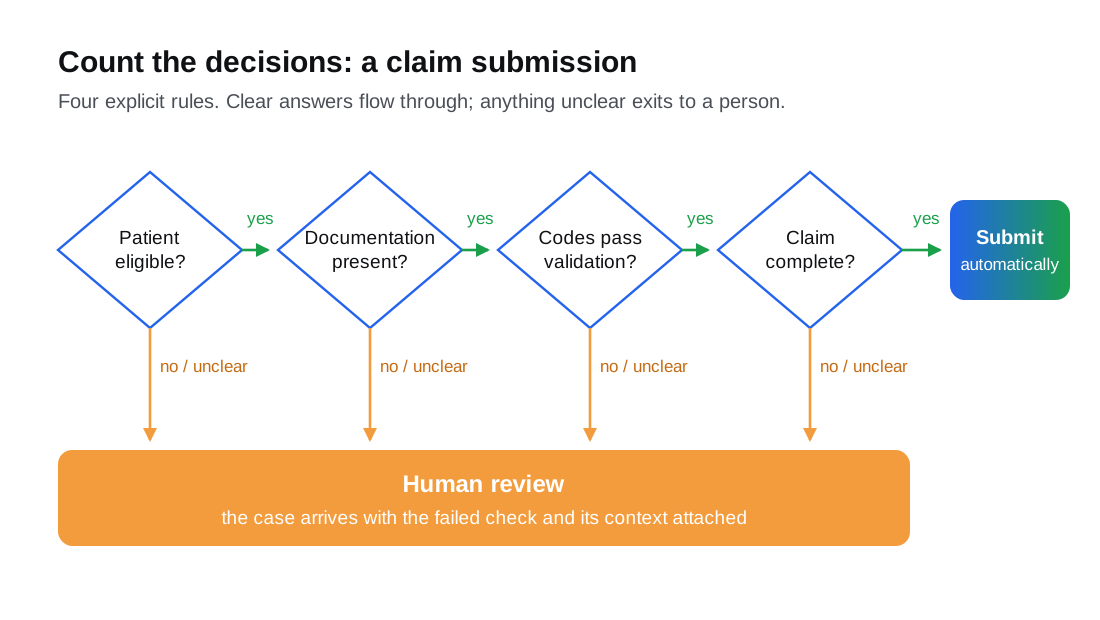
A workflow with a handful of predictable decisions can often run end to end, with people reviewing exceptions. A workflow with a dozen judgment calls is usually better served by automation that prepares the case (gathering documents, pre-filling forms, flagging what is missing) and a person who makes the call. Both are useful. They are different systems, and confusing them is how teams end up with an "AI" project that quietly needs a full-time human behind it.
Most of the engineering effort lands in integrations, not in the model: the practice management system, the EHR, clearinghouses, and payer portals each hold a piece of the decision, and the automation is only as reliable as the data it can reach.
Why documentation and voice are harder than they look
Ben is direct about the projects that were harder. Two stand out, and they are the same two that usually get picked first.
Clinical documentation. Transcription has improved a lot. But a transcript is not a clinical note. Physicians need accurate, structured documentation, and each one has preferences for how that documentation reads. A tool that produces a correct transcript and a generic note can still create more editing work than it saves. The hard part is the structure and the personalization, not the speech recognition.
Voice-based patient communication. Voice AI can improve access, including multilingual support. But adoption depends on patient trust and comfort, and some patients prefer a live representative. A voice agent that works technically can still underperform if it does not make it easy to reach a person, or if it is deployed where patients least want to talk to software.
Neither of these is a reason to avoid documentation or voice. They are reasons not to start there. Teams that first build the habits of automation on back-office work (process mapping, exception routing, measurement) arrive at the harder projects with the muscles they need.
AI cannot fix a broken process
Ben's central message for business leaders is that AI cannot fix a broken process. Successful implementation, as he describes it, requires process engineering, employee training, human oversight, and a clear understanding of where AI genuinely creates value.
In practice that means automating a messy workflow usually produces a faster mess. If prior authorizations stall because referral information arrives incomplete, an automated submission will stall faster. The fix is upstream: what gets captured at scheduling, who owns missing information, what a complete case looks like. Once that is defined, automation has something solid to run on.
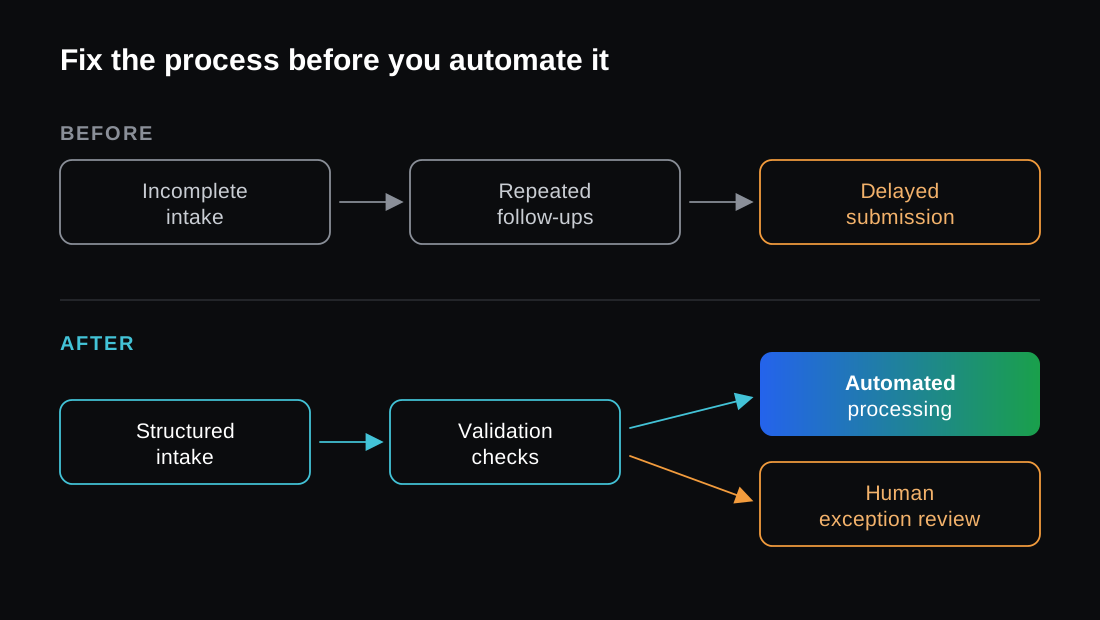
It also changes what people do. In Ben's organization, staff shifted from completing repetitive tasks to managing workflows, identifying defects, and evaluating automated outputs. That is a real job, and it needs training, clear ownership, and a way to see what the automation decided and why. An architecture that logs every automated decision with its inputs makes that review possible, and makes the system defensible when a payer or an auditor asks how a claim was handled.
Measure it the way Ben did: in operational terms. Throughput, the share of cases handled without human touch, turnaround time, denial and rework rates, and how many providers the same team can support. If the numbers do not move, the project is not working, regardless of how good the demo looked.
A practical starting checklist
Before you pick your first healthcare automation project:
- List your back-office workflows (eligibility, prior authorization, claim scrubbing, payment posting, denial follow-up) next to the visible ones.
- Count decision points for each, and mark which decisions two experienced staff would always agree on.
- Pick one workflow with a small number of predictable decisions and a clear, measurable output.
- Fix the process first. Remove the workarounds before you encode them.
- Design the human exit: who reviews exceptions, with what context, within what time.
- Log every automated decision so staff can evaluate outputs and you can answer an audit.
- Measure in operational terms, then expand to the next workflow.
Where Code Particle fits
We build AI automation for regulated organizations, and the work usually starts exactly here: mapping the workflow, counting the decisions, and wiring the systems that hold the data. If you already have an automation in place and want a second opinion before it touches more claims, a software audit will show where it is reliable and where it needs a human in the loop.
For the full conversation, including the projects that did not go to plan, listen to Ben Seals on Engineering Choices You Have to Defend.